Crawlability: What It Means for SEO and How to Fix It
AI Summary
What is crawlability? Crawlability is the measure of how effectively search engine bots can discover, access, and process the pages on your website. It covers the entire technical foundation that determines whether Googlebot can find your URLs, fetch their content, and pass that content to the indexing system for evaluation. When crawlability is broken, every other SEO investment, content quality, backlinks, on-page optimization, produces zero return because Google never sees the pages those investments were applied to.
What it is and who it is for: This guide is for site owners and SEO practitioners who need to understand the technical layer that sits between publishing content and Google indexing it. It covers crawl budget, orphan pages, crawl errors, and the full range of crawlability problems that prevent pages from entering the search pipeline. The detailed treatment of each topic lives in the tier articles linked from each section.
The rule: Crawlability is the only SEO discipline where failure makes every other discipline worthless. A site with broken crawlability and perfect content produces the same rankings as a site with no content at all: zero. Fix crawlability first. Everything else builds on it.
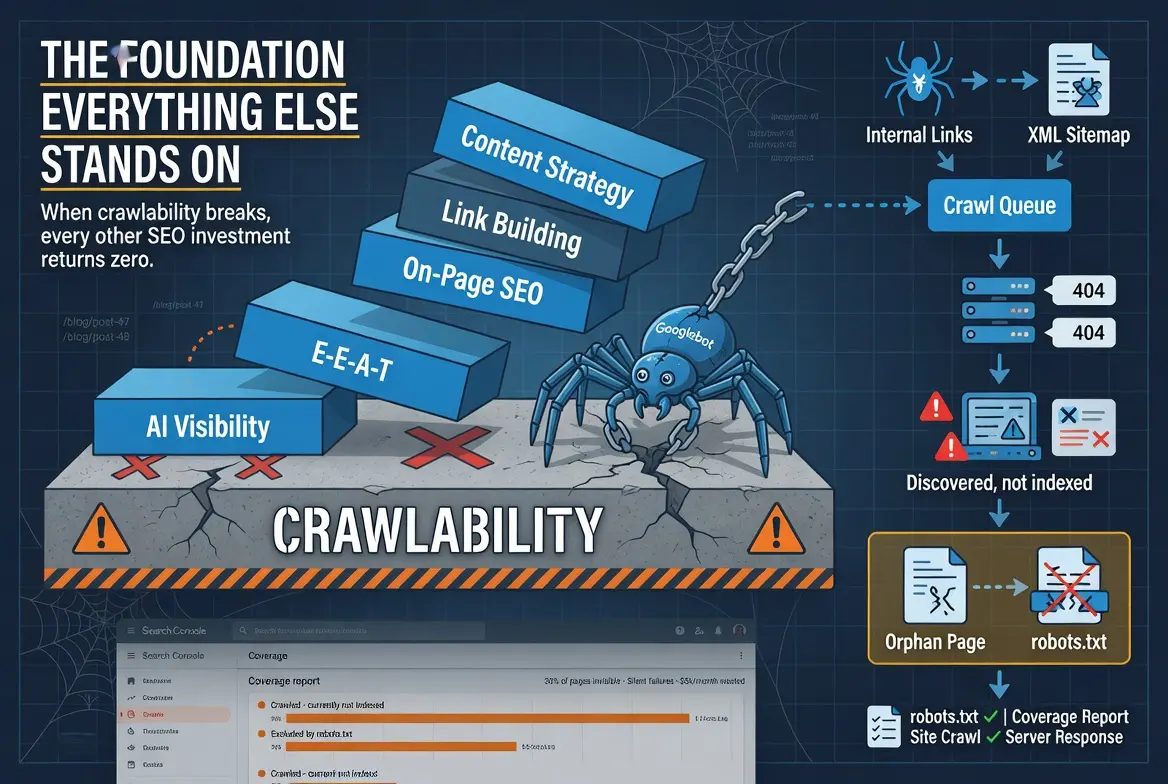
The Foundation Everything Else Stands On
Every SEO discipline assumes crawlability. Content strategy assumes Google will find the content. Link building assumes Google will follow the links to the pages they point at. On-page optimization assumes Google will crawl the page and process the optimization. E-E-A-T signal building assumes Google will evaluate the signals. Every one of these assumptions fails when crawlability is broken.
The assumption is usually safe. Most sites on modern hosting with reasonable architecture are crawlable by default. Google is very good at finding and processing web content. The problem is that crawlability failures are silent. They do not produce error messages on the live site. They do not trigger alerts in WordPress. The pages look fine in a browser. They are invisible only to the systems that determine whether those pages appear in search results.
I have audited sites that spent $5,000 per month on content production and link building while 30 percent of their published pages were invisible to Google. The content was excellent. The backlinks were legitimate. The on-page optimization was thorough. The investment was producing zero return on nearly a third of the pages because the crawl layer had failures that nobody checked. The fix took a day. The wasted investment was measured in months.
This guide covers the crawlability layer in full. Each section introduces a major component and links to the tier article that covers it exhaustively. The guide is the map. The tier articles are the territory.
How Google Crawls Your Site
Googlebot discovers pages through two mechanisms. Link-based discovery follows links from page to page across the web. When Googlebot crawls a page, it extracts every link on that page and adds the linked URLs to its crawl queue. Sitemap-based discovery reads the URLs listed in your XML sitemap and adds them to the queue. Link-based discovery is the primary mechanism. Sitemap-based discovery is supplementary.
Once a URL enters the crawl queue, Googlebot requests the page from your server. The server responds with the page content, which Googlebot downloads and passes to the indexing system. The indexing system evaluates the content, determines whether it meets the quality threshold for inclusion in the search index, and either adds it or excludes it. The entire sequence, from discovery through indexing, is the crawl-to-index pipeline that every page must pass through to appear in search results.
Crawlability failures can occur at any point in this sequence. Discovery failures mean the URL never enters the queue. Server failures mean the page content is never retrieved. Processing failures mean the content is retrieved but cannot be parsed correctly. Each failure type has different causes and different fixes, which is why diagnosing the specific failure point matters more than applying generic crawlability optimizations.
Crawl Budget
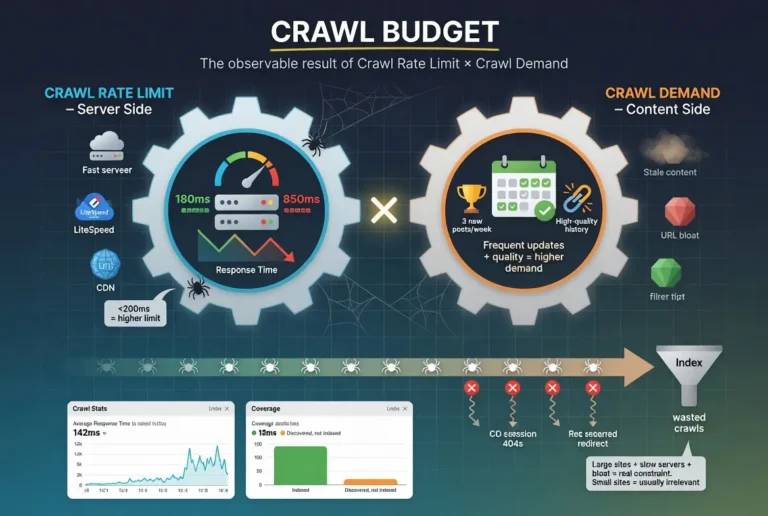
Crawl budget is the total crawl activity Google allocates to your site within a given time period. It is determined by two factors: crawl rate limit (how fast your server allows Google to crawl) and crawl demand (how much Google wants to crawl based on the perceived value of your content). The two factors multiply to produce the effective crawl budget.
For most small to mid-size sites, crawl budget is not a practical constraint. Google can crawl a 200-page site in a single session. The crawl budget conversation becomes operationally relevant for sites with thousands of pages, sites with slow servers that force Google to throttle its crawl rate, and sites with heavy URL bloat that dilutes crawl activity across non-indexable URLs.
The optimization levers for crawl budget are server performance (faster responses increase the crawl rate limit), publishing consistency (regular new content increases crawl demand), sitemap hygiene (removing non-indexable URLs focuses crawl attention), and URL pattern management (blocking non-indexable URL patterns through robots.txt prevents waste). Each lever is fully covered in the crawl budget tier article.
Orphan Pages
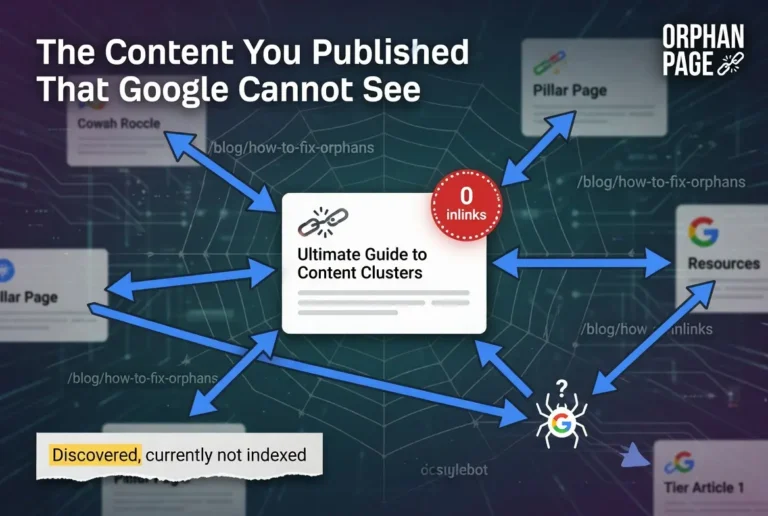
An orphan page is a published page with zero inbound internal links. No other page on the site links to it. Since Googlebot discovers pages by following links, an orphan page has no link pathway for the crawler to follow. The page exists on the server but is disconnected from the crawl architecture.
Orphan pages are created through predictable patterns: publishing new content without adding inbound links from existing pages, changing URL slugs without updating internal links, site restructuring that removes link pathways, and pagination burial that pushes older content beyond the crawler’s reach. Each pattern produces the same result: a page that was intended to rank but has no structural connection to the rest of the site.
The damage extends beyond the individual page. An orphan page in a content cluster weakens the entire cluster’s topical authority signal because the cluster has a gap in its coverage. The orphan receives no internal authority from the site. The cluster loses the authority contribution the orphan would provide if it were connected.
Finding orphan pages requires comparing the URLs that exist on the site against the URLs that have inbound internal links. The difference between those two lists is the orphan inventory. Fixing them requires adding internal links from relevant existing pages. Prevention requires including internal link verification in the publishing workflow. The full diagnostic and remediation process is covered in the orphan pages tier article.
Crawl Errors
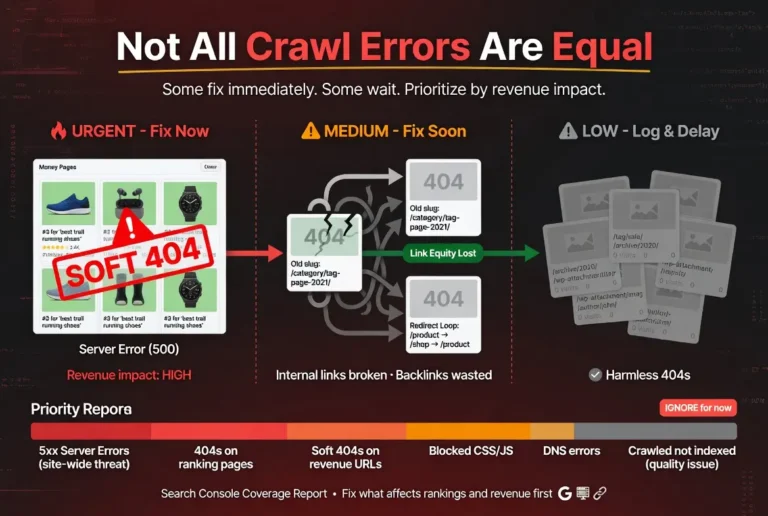
Crawl errors are failures that occur when Googlebot attempts to access a page and cannot retrieve it successfully. They appear in Search Console’s coverage report and include server errors (5xx), page not found errors (404), soft 404s, redirect errors, blocked resources, and DNS failures.
Not all crawl errors are equal in impact. A 404 on a page that ranked for a commercial keyword and has inbound backlinks is an emergency that needs immediate attention. A 404 on a tag page that generated zero traffic and zero backlinks is a cleanup item that can wait. The prioritization framework for crawl errors evaluates each error against the page’s ranking value, backlink profile, and internal link equity to determine whether the fix is urgent, important, or cosmetic.
The most dangerous crawl errors are the ones that are hardest to detect. Soft 404s return a 200 status code while displaying “not found” content, hiding the error from basic monitoring. Accidental noindex tags remove pages from the index while producing no visible error on the live site. Blocked resources prevent Googlebot from rendering pages correctly while the pages appear fine in a browser. Each of these silent failures can persist for weeks or months before being discovered.
The full taxonomy of crawl errors, their causes, their impact, and their fixes is covered in the crawl errors tier article.
Crawlability Problems
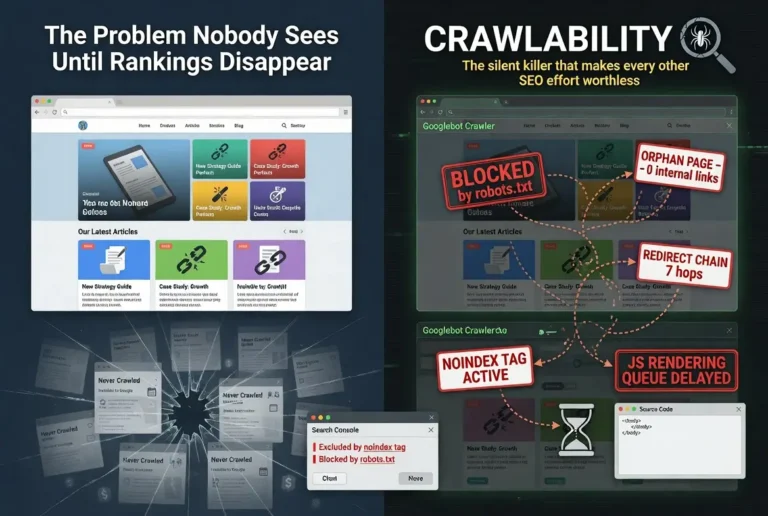
Crawlability problems are the broader category of technical issues that prevent search engine bots from discovering, accessing, or processing pages effectively. They encompass crawl errors but also include structural issues that do not produce individual error reports: deep site architecture that buries pages beyond crawl reach, robots.txt misconfigurations that block entire sections of the site, redirect chains that waste crawl budget and dilute link equity, slow server response times that throttle crawl frequency, and JavaScript rendering dependencies that prevent Googlebot from seeing page content.
The characteristic that makes crawlability problems uniquely dangerous is their silence. A misconfigured robots.txt can block 50 pages from crawling without producing a single alert in WordPress or Search Console. A redirect chain can grow from two hops to seven over the course of three site migrations without anyone noticing. Server response degradation can increase gradually over months as traffic grows and the hosting plan falls behind. Each of these problems compounds silently until the symptoms become visible in rankings, at which point the damage has been accumulating for weeks or months.
The diagnostic approach is to audit crawlability proactively rather than waiting for symptoms. Check robots.txt against your intended indexing plan. Run site crawls to identify orphan pages and redirect chains. Monitor server response times in Search Console’s crawl stats. Review the coverage report for growing backlogs of discovered-but-not-indexed pages. The full diagnostic framework and remediation process is covered in the crawlability problems tier article.
Internal Linking as the Crawl Architecture
Internal links serve two functions that overlap but are distinct. The SEO function distributes authority across the site and establishes topical relationships between pages. The crawlability function creates the pathways that Googlebot uses to navigate from page to page and discover content.
A site with strong internal linking architecture is crawlable by design. Every important page is reachable within two or three clicks of the homepage. Every page in a cluster links to its pillar and its pillar links back. Cross-links between related pages create redundant crawl pathways that ensure the crawler can reach content through multiple routes. No page is orphaned. No page is buried.
A site with weak internal linking forces Googlebot to rely on the sitemap for discovery, which is a secondary mechanism that produces lower-priority crawl activity. Pages discovered only through the sitemap are crawled less frequently than pages discovered through internal links. The internal linking architecture is not just a ranking signal. It is the crawl infrastructure that determines which pages get found, how often they get re-crawled, and how quickly new content enters the index.
The pillar and cluster model that Star Diamond SEO builds for every content architecture solves crawlability structurally. The architecture requires bidirectional linking between every page in the cluster, which eliminates orphan pages by design, creates efficient crawl pathways that keep every page within three clicks of the homepage, and distributes authority through the same link structure the crawler uses to navigate.
The Crawlability Audit
A crawlability audit follows a specific sequence that identifies the highest-impact problems first.
Start with robots.txt. Read the file. Verify that every page you want indexed is accessible under the current rules. Check for blanket disallow rules left over from development. Confirm the sitemap URL is declared. This takes five minutes and catches catastrophic misconfigurations that explain months of underperformance.
Check Search Console’s coverage report. Review each exclusion category. Count the pages in “Discovered, currently not indexed” and “Crawled, currently not indexed.” Compare the indexed count against the total URLs in your sitemap. A large gap between submitted and indexed indicates either crawlability constraints or quality threshold failures. The exclusion reason tells you which one.
Run a site crawl. Use Ahrefs Site Audit, Screaming Frog, or a similar crawler. Filter for orphan pages, redirect chains, 404 errors, soft 404s, pages with noindex tags, and pages blocked by robots.txt. The crawl tool shows you what the crawler sees, which is often different from what the browser shows. The gap between the two is where crawlability problems live.
Check server response times. Navigate to Settings > Crawl Stats in Search Console. Look at the average response time trend. Consistent times under 200ms are healthy. Times above 500ms are concerning. Times above 1,000ms are actively constraining crawl frequency.
Prioritize the findings by impact. Robots.txt blocks and site-wide noindex issues affect the entire site. Server response problems affect crawl frequency across all pages. Orphan pages and redirect chains affect individual pages. Fix in that order for the fastest recovery.
Crawlability and AI Search Visibility
The crawlability layer that determines whether Google indexes your pages also determines whether AI search platforms can cite your content. Google AI Overviews pull from Google’s indexed web. ChatGPT with web browsing accesses pages through the same HTTP requests that Googlebot uses. Perplexity crawls the web with its own bot that encounters the same technical barriers Googlebot does.
A page blocked by robots.txt is invisible to Google and invisible to AI platforms that respect robots directives. A page that returns server errors is inaccessible to both crawlers and AI retrieval systems. A page buried so deep in the site architecture that no crawler reaches it is absent from both the search index and the AI platforms that draw from it.
The implication is that crawlability optimization serves both layers of search visibility simultaneously. Fixing a robots.txt misconfiguration makes pages visible to Google and to AI platforms. Improving server response times accelerates crawling by both Googlebot and AI retrieval bots. Building strong internal linking architecture creates crawl pathways that serve every system that navigates your site through links.
Crawlability is the infrastructure layer. When it works, everything built on top of it, organic rankings, AI citations, referral traffic from linked sources, functions as intended. When it is broken, nothing built on top of it functions at all.
Verdict
Crawlability is the technical foundation that every other SEO discipline depends on. It covers how Googlebot discovers, accesses, and processes pages on your site. When crawlability works, it is invisible. When it breaks, it makes every other investment in content, links, and optimization produce zero return on the affected pages.
The major components of crawlability are crawl budget (how much crawl activity Google allocates to your site), orphan pages (pages disconnected from the site’s link architecture), crawl errors (failures in the crawl-to-index pipeline), and crawlability problems (the broader technical issues that prevent effective crawling). Each component has its own diagnostic process and its own remediation path.
The audit sequence is: robots.txt first, Search Console coverage report second, site crawl third, server response times fourth. Fix in order of impact: site-wide issues first, page-level issues second. Monitor continuously because new crawlability problems appear whenever content is published, URLs change, or the site evolves.
Crawlability is not exciting. It is not the part of SEO that produces dramatic before-and-after charts. It is the part that determines whether the dramatic improvements from content and link building actually reach Google. Fix it first. Build everything else on top of it. The foundation determines what the structure can support.
FAQ
What is crawlability in SEO?
Crawlability is the measure of how effectively search engine bots can discover, access, and process the pages on your website. It covers the technical infrastructure that determines whether Googlebot can find your URLs through links and sitemaps, fetch their content from your server, and pass that content to the indexing system for evaluation. When crawlability is broken, pages cannot enter the search index regardless of their content quality or backlink profile.
Why is crawlability important for SEO?
Crawlability is the foundation that every other SEO discipline depends on. Content quality, backlink authority, on-page optimization, and E-E-A-T signals only affect rankings after Google has successfully crawled and indexed the page they are applied to. A page that Google cannot crawl receives zero benefit from any of these investments. Crawlability failures make every other SEO investment on the affected pages worthless.
How do I check if my site has crawlability issues?
Start with Google Search Console’s coverage report. Look for pages in “Discovered, currently not indexed,” “Blocked by robots.txt,” or “Excluded by noindex tag” categories. Check the crawl stats report for server response times above 500 milliseconds. Run a site crawl through Ahrefs or Screaming Frog to identify orphan pages, redirect chains, and 404 errors. The combination of these checks identifies the most common crawlability problems.
What is crawl budget and does it matter for my site?
Crawl budget is the total crawl activity Google allocates to your site based on your server’s capacity and the perceived value of your content. For small sites with fewer than a few thousand pages and decent hosting, crawl budget is rarely a constraint. It becomes relevant for large sites with tens of thousands of pages, sites with slow servers, and sites where new content consistently takes weeks to get indexed.
What are the most common crawlability problems?
The most common crawlability problems are robots.txt misconfigurations that block pages from crawling, orphan pages with no inbound internal links, redirect chains that waste crawl budget, slow server response times that throttle crawl frequency, accidental noindex tags that prevent indexing, and pages buried too deep in the site architecture for the crawler to reach efficiently.
How does crawlability affect AI search visibility?
Pages that Google cannot crawl are also invisible to AI search platforms. Google AI Overviews pull from the indexed web. ChatGPT and Perplexity access pages through the same HTTP requests that Googlebot uses. A page blocked by robots.txt or returning server errors is inaccessible to both traditional search crawlers and AI retrieval systems. Fixing crawlability problems makes pages visible across both layers of search visibility simultaneously.
How long does it take to fix crawlability issues?
Most crawlability fixes can be implemented within hours or days. Robots.txt corrections, noindex tag removal, internal link additions, redirect chain collapses, and sitemap cleanup are all quick technical changes. The recovery time after implementation depends on how frequently Google crawls the site. Sites with high crawl frequency may see improvements within days. Sites with lower crawl frequency may wait one to three weeks for Google to re-crawl the affected pages.
FAQ
What is crawlability in SEO?
Crawlability is the measure of how effectively search engine bots can discover, access, and process the pages on your website. It covers the technical infrastructure that determines whether Googlebot can find your URLs through links and sitemaps, fetch their content from your server, and pass that content to the indexing system for evaluation. When crawlability is broken, pages cannot enter the search index regardless of their content quality or backlink profile.
Why is crawlability important for SEO?
Crawlability is the foundation that every other SEO discipline depends on. Content quality, backlink authority, on-page optimization, and E-E-A-T signals only affect rankings after Google has successfully crawled and indexed the page they are applied to. A page that Google cannot crawl receives zero benefit from any of these investments. Crawlability failures make every other SEO investment on the affected pages worthless.
How do I check if my site has crawlability issues?
Start with Google Search Console’s coverage report. Look for pages in “Discovered, currently not indexed,” “Blocked by robots.txt,” or “Excluded by noindex tag” categories. Check the crawl stats report for server response times above 500 milliseconds. Run a site crawl through Ahrefs or Screaming Frog to identify orphan pages, redirect chains, and 404 errors. The combination of these checks identifies the most common crawlability problems.
What is crawl budget and does it matter for my site?
Crawl budget is the total crawl activity Google allocates to your site based on your server’s capacity and the perceived value of your content. For small sites with fewer than a few thousand pages and decent hosting, crawl budget is rarely a constraint. It becomes relevant for large sites with tens of thousands of pages, sites with slow servers, and sites where new content consistently takes weeks to get indexed.
What are the most common crawlability problems?
The most common crawlability problems are robots.txt misconfigurations that block pages from crawling, orphan pages with no inbound internal links, redirect chains that waste crawl budget, slow server response times that throttle crawl frequency, accidental noindex tags that prevent indexing, and pages buried too deep in the site architecture for the crawler to reach efficiently.
How does crawlability affect AI search visibility?
Pages that Google cannot crawl are also invisible to AI search platforms. Google AI Overviews pull from the indexed web. ChatGPT and Perplexity access pages through the same HTTP requests that Googlebot uses. A page blocked by robots.txt or returning server errors is inaccessible to both traditional search crawlers and AI retrieval systems. Fixing crawlability problems makes pages visible across both layers of search visibility simultaneously.
How long does it take to fix crawlability issues?
Most crawlability fixes can be implemented within hours or days. Robots.txt corrections, noindex tag removal, internal link additions, redirect chain collapses, and sitemap cleanup are all quick technical changes. The recovery time after implementation depends on how frequently Google crawls the site. Sites with high crawl frequency may see improvements within days. Sites with lower crawl frequency may wait one to three weeks for Google to re-crawl the affected pages.