Crawlability Problems and Issues: The Silent SEO Killer
AI Summary
What are crawlability problems? Crawlability problems are any technical issues that prevent search engine bots from discovering, accessing, or processing pages on your website. They include misconfigured robots.txt files, broken internal links, slow server response times, redirect chains, orphan pages, JavaScript rendering failures, and indexing directive errors. These problems are silent because they do not produce visible errors on the live site. The pages look fine in a browser. They are invisible or broken to Googlebot.
What it is and who it is for: This article is for site owners and SEO practitioners who suspect their site has crawlability issues but cannot identify where the problems are or how severe they are. It covers the most common crawlability problems, how each one manifests in Google Search Console, and the specific fix for each one.
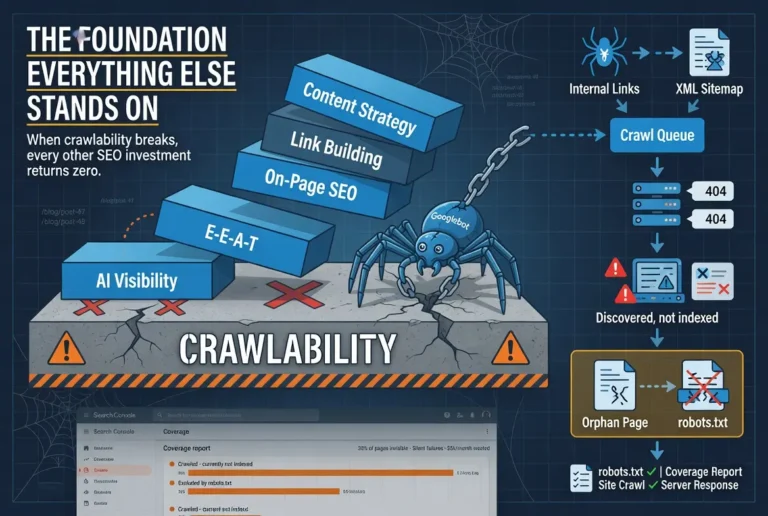
The rule: Crawlability problems are the only SEO problems that make every other investment worthless. Content quality, backlink authority, on-page optimization, none of it matters if Googlebot cannot reach the page. Crawlability is the foundation. When the foundation has cracks, everything built on top of it underperforms.
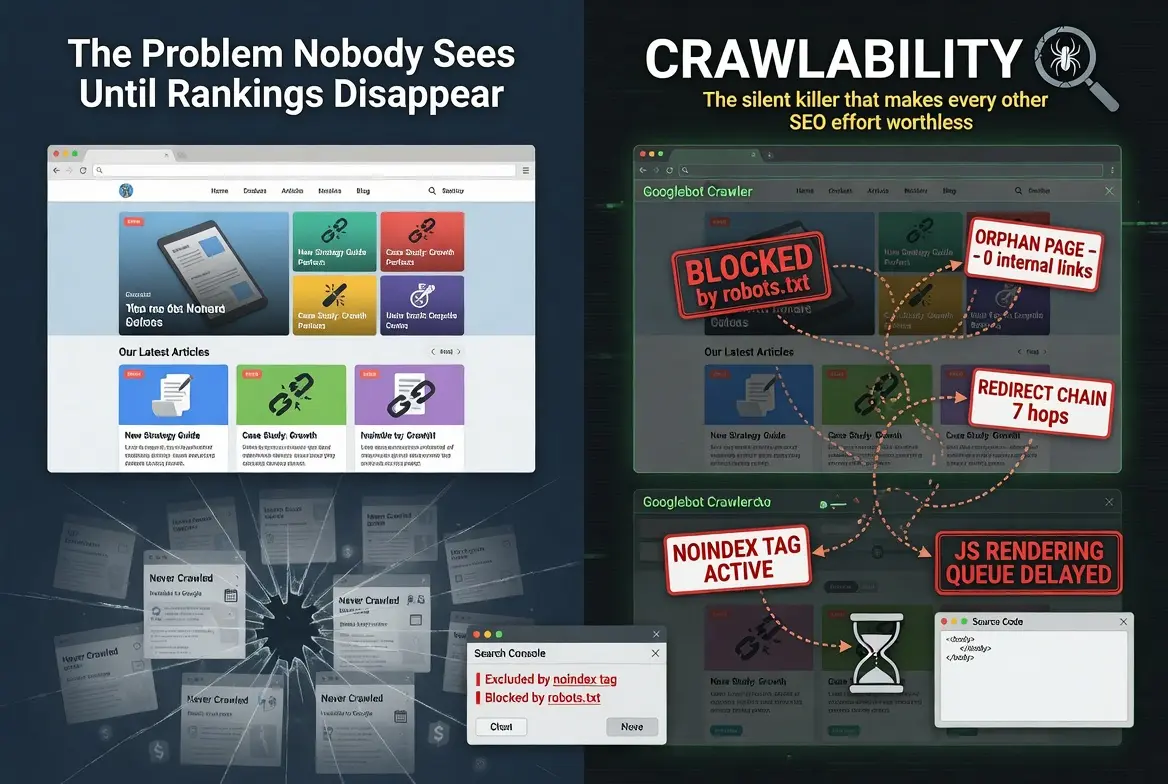
The Problem Nobody Sees Until Rankings Disappear
Crawlability problems are the only category of SEO issue that can make every other investment worthless simultaneously. A site can have world-class content, a strong backlink profile, perfect on-page optimization, and a publishing cadence that signals authority to Google. If the crawler cannot reach the pages, none of it registers. The content might as well not exist.
The reason crawlability problems are so dangerous is that they produce no visible symptoms on the live site. A page with a robots.txt block looks perfectly normal in a browser. A page buried behind seven navigation layers loads fine when you click to it. A page returning a soft 404 renders content that looks correct. The problems are invisible to humans and visible only to the systems that determine whether the page appears in search results.
I have audited sites where 40 percent of the published content was invisible to Google. Not penalized. Not outranked. Invisible. The pages were never crawled because the internal linking created no pathway for the crawler to find them. The site owner had spent months producing content and building backlinks without realizing that nearly half the investment was being directed at pages Google did not know existed. The fix took two days. The recovery took three months. The time between publishing and fixing was wasted entirely.
Robots.txt Misconfigurations
The robots.txt file is supposed to tell Googlebot which parts of the site to crawl and which to skip. When it is misconfigured, it tells Googlebot to skip pages you want indexed. The file sits at the root of your domain, and a single misplaced directive can block entire sections of the site from crawling.
The most common robots.txt problems are blanket disallow rules that block more than intended, leftover directives from development or staging environments that were never removed, and missing sitemap declarations that prevent Googlebot from discovering the sitemap automatically. A robots.txt file that contains Disallow: / blocks the entire site. A file that contains Disallow: /blog when your content lives at /blog/ blocks every article on the site.
The fix is straightforward: audit the robots.txt file against the pages you want indexed. Every page you want in Google’s index should be accessible under the current robots.txt rules. The sitemap URL should be declared in the file. And the file should be tested using Google Search Console’s robots.txt tester to verify that the rules produce the behavior you intend.
I check robots.txt first on every audit because it is the fastest way to identify a catastrophic crawlability failure. A misconfigured robots.txt can explain months of underperformance in thirty seconds of reading.
Orphan Pages
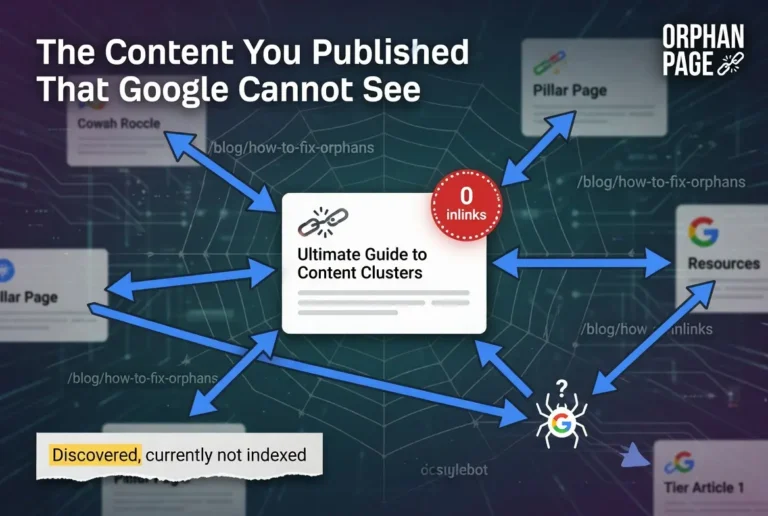
An orphan page is a page with zero inbound internal links. It exists on the server. It has a URL. It may even appear in the sitemap. But no other page on the site links to it, which means Googlebot has no pathway to discover it through normal crawling. The crawler finds pages by following links. A page with no inbound links is a dead end that the crawler never reaches.
Orphan pages are created through predictable patterns. A new article gets published but never linked from the pillar page or related content. A page gets removed from the navigation during a redesign but the URL stays live. A URL slug gets changed but the internal links pointing to it are not updated, leaving the new URL orphaned while the old URL returns a 404. Each of these patterns produces a page that exists but has no connection to the rest of the site.
The diagnostic is simple: crawl the site with a tool like Ahrefs Site Audit or Screaming Frog and filter for pages with zero inbound internal links. Every page on that list is an orphan. The fix is equally simple: add internal links from relevant pages. If the orphan page is part of a content cluster, it should link to the pillar and the pillar should link to it. If it is a standalone page, it should be linked from the most topically relevant existing page on the site.
Redirect Chains and Loops
A redirect chain occurs when a URL redirects to a second URL, which redirects to a third URL, which may redirect again before reaching the final destination. Each hop in the chain costs crawl efficiency and dilutes the link equity attached to the original URL. A redirect loop occurs when URL A redirects to URL B, which redirects back to URL A, creating an infinite cycle that the crawler cannot resolve.
Redirect chains accumulate naturally over time. A site migration changes URL structures, creating redirects from old URLs to new ones. A second migration changes the structure again, and the redirects chain: old URL redirects to first new URL, which redirects to second new URL. Slug changes on individual pages add hops. Category restructuring adds more. After two or three years of normal site operations, redirect chains of three to five hops are common and chains of seven or more are not unusual.
The fix is to collapse every chain into a single-hop redirect from the original URL directly to the final destination. This preserves the maximum link equity, reduces crawl waste, and eliminates the possibility of chains degrading into loops as the site continues to evolve. The audit tool for this is any crawler that reports redirect chains by hop count. Filter for chains with two or more hops and collapse each one.
Slow Server Response Times
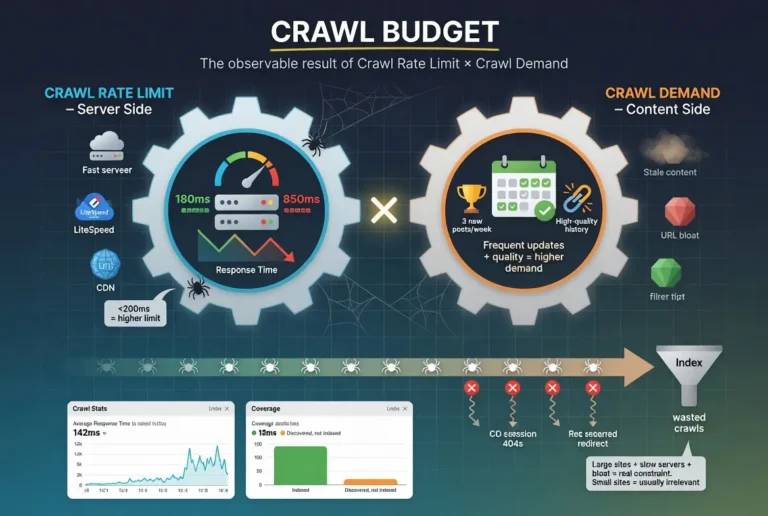
Googlebot measures how quickly your server responds to crawl requests. When the server responds slowly, Google throttles its crawl rate to avoid overloading the host. Fewer pages get crawled per session. New content takes longer to get discovered. Updated content takes longer to get re-crawled. The entire pipeline slows down because the entry point is constrained.
Server response time problems show up in Search Console’s crawl stats report. Average response times above 500 milliseconds indicate a potential bottleneck. Response times above 1,000 milliseconds are a clear problem that affects crawl frequency. The most common causes are underpowered shared hosting, unoptimized databases, missing server-side caching, and plugins or themes that execute heavy database queries on every page load.
The fix depends on the cause. Shared hosting that cannot handle the traffic needs an upgrade to managed hosting or a VPS. Database optimization through query caching and table optimization reduces response times without changing hosts. Server-side caching through LiteSpeed Cache, WP Rocket, or similar plugins eliminates redundant processing on repeated requests. The goal is consistent response times under 200 milliseconds, which keeps Googlebot crawling at maximum rate.
Pages Buried Too Deep in Site Architecture
Googlebot allocates its crawl budget across the site based partly on how many clicks each page is from the homepage. Pages reachable in one or two clicks get crawled most frequently. Pages reachable in three or four clicks get crawled regularly. Pages buried behind five, six, or seven clicks may get crawled infrequently or not at all, depending on the site’s overall crawl budget and the perceived value of the deeper pages.
Deep architecture problems are most common on sites that grow organically without deliberate internal linking architecture. Articles get published and linked from the blog index page, which paginates. By the time the site has 200 articles, the oldest articles are buried behind 20 pages of pagination. Googlebot has to crawl through every pagination page to reach the oldest content. It usually does not bother.
The fix is structural. Hub pages, category pages, and pillar pages should link directly to the most important content regardless of publication date. Pillar and cluster architecture solves this naturally because every tier article is linked from the pillar, keeping it within two or three clicks of the homepage. For sites without cluster architecture, adding contextual internal links from high-authority pages to buried content brings those pages back into crawl range.
Accidental Noindex Tags
A meta noindex tag tells Google to crawl the page but not include it in the search index. When applied intentionally to pages like admin panels, thank-you pages, or duplicate content, the tag works correctly. When applied accidentally to content pages, it removes them from search results silently.
Accidental noindex tags come from several sources. WordPress maintenance mode plugins that add noindex to every page during maintenance and fail to remove it when maintenance ends. SEO plugins with global settings that default new pages to noindex until manually switched. Staging environments where noindex was set during development and carried over to production when the site launched. Each source produces the same result: pages that Google crawls, evaluates, and then excludes from the index because the page itself requested exclusion.
The symptom in Search Console is pages showing “Excluded by noindex tag” in the coverage report. The fix is to remove the noindex tag and request re-indexing through Search Console. The recovery is usually fast because Google already has the content from previous crawls. It just needs the directive removed to include the page in the index.
I have seen this one more than any other crawlability problem on WordPress sites. A two-week maintenance mode period with a plugin that adds noindex to every page can take months to fully recover from if the noindex tags are not removed immediately when maintenance ends, because Google has to re-crawl every affected page and re-evaluate it for inclusion.
JavaScript Rendering Failures
Pages that rely on JavaScript to render their content present a unique crawlability challenge. Googlebot can render JavaScript, but it does so through a separate rendering queue that processes pages on a delayed schedule. A page that loads its content entirely through client-side JavaScript may wait hours or days for Googlebot to render it and see the actual content. During that delay, the page appears empty to the indexing system.
The problem is most severe on single-page applications and sites using frameworks like React, Angular, or Vue without server-side rendering. The HTML that Googlebot receives on the initial crawl contains no content because the content is loaded by JavaScript after the page renders in the browser. If the rendering queue is backed up or the JavaScript execution fails, the page gets indexed as an empty page or not indexed at all.
The fix is server-side rendering or pre-rendering for any page that needs to appear in search results. Server-side rendering generates the full HTML on the server before sending it to the browser, which means Googlebot sees the complete content on the initial crawl without waiting for JavaScript execution. Pre-rendering serves a static HTML version to bots while serving the JavaScript version to users. Both solutions eliminate the dependency on Googlebot’s rendering queue.
For WordPress sites, JavaScript rendering is rarely a problem because WordPress generates server-side HTML by default. The issue appears when heavy JavaScript plugins or themes override the default behavior and load content dynamically. Testing is simple: view the page source in a browser. If the content is visible in the raw HTML, Googlebot sees it. If the content only appears after JavaScript executes, there is a rendering dependency that needs to be resolved.
How to Diagnose Crawlability Problems
The diagnostic process follows a specific sequence that identifies the most impactful problems first.
Start with Google Search Console’s coverage report. Filter for “Excluded” pages and review each exclusion reason. “Blocked by robots.txt” means the robots.txt is preventing crawling. “Excluded by noindex tag” means a directive is preventing indexing. “Crawled, currently not indexed” means the page was crawled but failed the quality threshold for indexing. “Discovered, currently not indexed” means the page is in the crawl queue but has not been processed yet. Each status points to a different problem at a different stage of the Google search pipeline.
Next, check the crawl stats report in Search Console. Look at the average response time, the number of crawl requests per day, and the trend over time. A declining crawl rate paired with increasing response times indicates a server performance problem. A stable crawl rate with a growing gap between discovered and indexed pages indicates a quality threshold problem rather than a crawlability problem.
Then run a site crawl through Ahrefs Site Audit or Screaming Frog. Filter for orphan pages, redirect chains, 404 errors, and pages blocked by robots.txt or noindex tags. The crawl tool shows you what the crawler sees, which is often different from what you see in the browser. The gap between the two is where crawlability problems live.
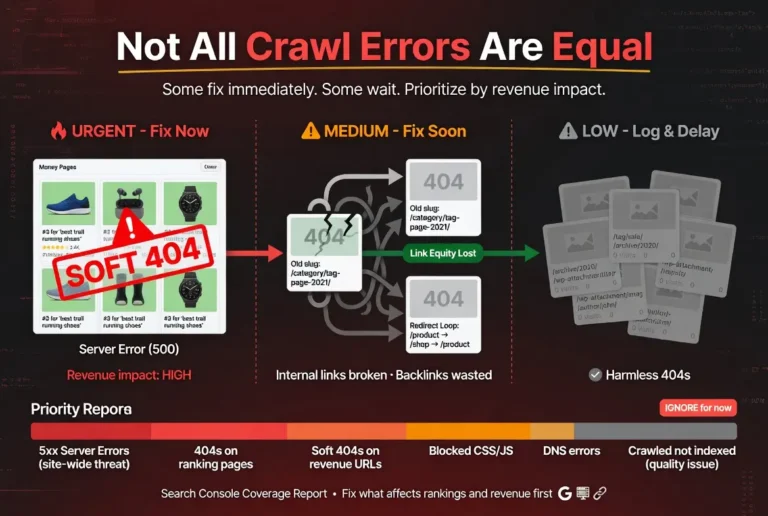
The diagnostic sequence matters because it prioritizes impact. Robots.txt blocks and noindex errors affect entire page categories. Server response problems affect crawl frequency across the entire site. Orphan pages and redirect chains affect individual pages. Fixing in that order produces the fastest recovery.
FAQ
What are the most common crawlability problems?
The most common crawlability problems are robots.txt misconfigurations that block pages from being crawled, orphan pages with no inbound internal links that the crawler cannot discover, redirect chains that waste crawl budget and dilute link equity, slow server response times that cause Google to throttle its crawl rate, accidental noindex tags that prevent pages from being indexed, and JavaScript rendering dependencies that prevent Googlebot from seeing page content on the initial crawl.
How do I know if my site has crawlability issues?
Check Google Search Console’s coverage report. Pages showing “Blocked by robots.txt,” “Excluded by noindex tag,” “Discovered, currently not indexed,” or “Crawled, currently not indexed” all indicate crawlability or indexability problems. The crawl stats report shows server response times and crawl frequency trends. A declining crawl rate or increasing response times indicate infrastructure-level crawlability problems affecting the entire site.
Can crawlability problems cause rankings to drop?
Yes. Crawlability problems can cause pages to be removed from the index entirely, which eliminates their rankings. They can also cause pages to be crawled less frequently, which delays the impact of content updates and optimization changes. In severe cases, site-wide crawlability problems like blanket robots.txt blocks or global noindex tags can remove an entire site from search results.
What is the difference between crawlability and indexability?
Crawlability is whether Googlebot can discover and access a page. Indexability is whether Google decides to include the page in its search index after crawling it. A page can be fully crawlable but not indexable if it fails Google’s quality threshold or carries a noindex directive. Crawlability problems prevent the page from being seen at all. Indexability problems prevent a seen page from being included in search results.
How long does it take to fix crawlability problems?
Most crawlability fixes can be implemented in hours or days. Robots.txt corrections, noindex tag removal, internal link additions, and redirect chain collapses are all quick technical changes. The recovery time after the fix depends on how frequently Google crawls the site. Sites with high crawl frequency may see recovery within days. Sites with low crawl frequency may wait weeks for Google to re-crawl the affected pages and process the changes.
Do crawlability problems affect all search engines or just Google?
Crawlability problems affect all search engines because all crawlers use similar mechanisms to discover and access pages. Robots.txt directives, server response times, redirect chains, and internal linking architecture affect Googlebot, Bingbot, and every other search engine crawler. Fixing crawlability problems for Google simultaneously fixes them for all search engines.