Do Website Speed Tests Actually Matter for SEO?
AI Summary
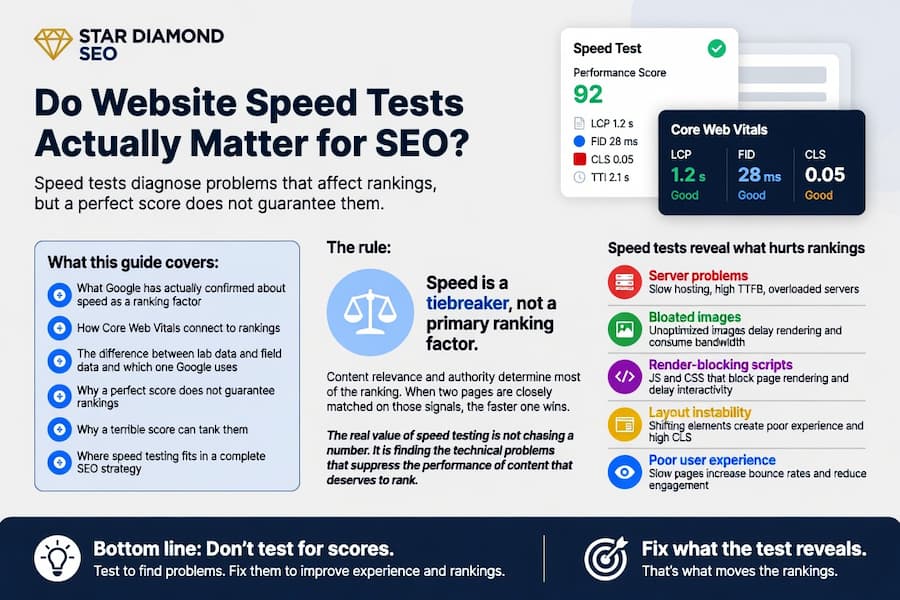
Do speed tests matter for SEO? Yes, but not the way most people think. A speed test does not improve your rankings. What you fix because of a speed test can. The test itself is a diagnostic tool. It reveals server problems, bloated images, render-blocking scripts, and layout instability that hurt both the visitor experience and the signals Google uses to evaluate your pages. The score is not the point. The problems the score exposes are.
What this guide covers: What Google has actually confirmed about speed as a ranking factor, how Core Web Vitals connect to rankings, the difference between lab data and field data and which one Google uses, why a perfect score does not guarantee rankings, why a terrible score can tank them, and where speed testing fits in a complete SEO strategy.
The rule: Speed is a tiebreaker, not a primary ranking factor. Content relevance and authority determine most of the ranking. When two pages are closely matched on those signals, the faster one wins. The real value of speed testing is not chasing a number. It is finding the technical problems that suppress the performance of content that deserves to rank.
Does Page Speed Actually Affect SEO?
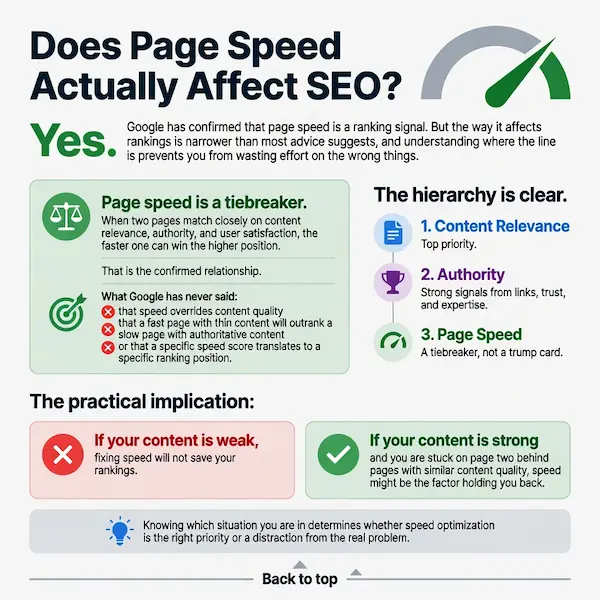
Yes. Google has confirmed that page speed is a ranking signal. But the way it affects rankings is narrower than most advice suggests, and understanding where the line is prevents you from wasting effort on the wrong things.
Page speed is a tiebreaker. When two pages match closely on content relevance, authority, and user satisfaction, the faster one can win the higher position. That is the confirmed relationship. What Google has never said is that speed overrides content quality, that a fast page with thin content will outrank a slow page with authoritative content, or that a specific speed score translates to a specific ranking position. The signal exists, but it sits below content relevance and authority in the hierarchy of how Google ranks search results.
The practical implication: if your content is weak, fixing speed will not save your rankings. If your content is strong and you are stuck on page two behind pages with similar content quality, speed might be the factor holding you back. Knowing which situation you are in determines whether speed optimization is the right priority or a distraction from the real problem.
What Google Has Confirmed About Speed and Rankings
Google introduced page speed as a ranking factor for desktop search in 2010 and extended it to mobile search in 2018 with the “Speed Update.” In 2021, Google rolled Core Web Vitals into the page experience ranking signal, replacing the older, less specific speed signals with three defined metrics that measure loading, stability, and responsiveness.
Google has been consistent about how much weight speed carries. Their documentation describes page experience as a tiebreaker, not a dominant signal. In competitive queries where multiple pages satisfy the user’s intent equally well, page experience, including speed, can be the differentiator. In queries where one page clearly answers the intent better than the others, that page ranks higher regardless of its speed.
What Google has not done is publish a formula that connects a specific speed metric to a specific ranking boost. There is no “improve LCP by 500 milliseconds and gain three positions” relationship. The signal is relative, not absolute. You do not need the fastest site on the internet. You need to pass the thresholds that separate “good” from “needs improvement” so the signal works in your favor rather than against you.
Core Web Vitals as a Ranking Signal
Core Web Vitals are the specific metrics Google uses to evaluate page speed and user experience. There are three of them, and each measures a different dimension of how the page feels to the person using it.
Largest Contentful Paint measures loading speed. Specifically, how long it takes for the largest visible content element to render. The threshold for good LCP is 2.5 seconds or less.
Cumulative Layout Shift measures visual stability. It quantifies how much the visible content moves around unexpectedly while the page loads. The threshold for good CLS is 0.1 or less.
Interaction to Next Paint measures responsiveness. It tracks how quickly the page responds when someone clicks, taps, or uses the keyboard. The threshold for good INP is 200 milliseconds or less.
These three metrics replaced the older, less defined speed signals that Google used before 2021. The change was an improvement for site owners because it gave specific, measurable targets instead of a vague “be faster” directive. You know exactly what to measure, what the thresholds are, and which metric is failing. That precision makes speed optimization actionable rather than guesswork.
Field Data vs Lab Data: Which One Google Uses
This distinction matters more than most people realize, and getting it wrong leads to optimizing the wrong thing.
Lab data comes from tools that run a simulated page load in a controlled environment. PageSpeed Insights, GTmetrix, and Lighthouse all produce lab data. The test runs from a fast server on a clean connection, which means the results reflect ideal conditions that most real visitors will never experience.
Field data comes from real users visiting your site on their own devices and connections. Google collects this through the Chrome User Experience Report, aggregating the experience of real Chrome users over a rolling 28-day window. Field data reflects reality: slow phones, spotty connections, users on the other side of the world from your server.
Google uses field data for ranking, not lab data. A page can score perfectly in a lab test and still fail its Core Web Vitals assessment because real users on real devices have a worse experience than the simulated test predicted. The reverse is also true. A page with mediocre lab scores might pass in the field because your actual visitors are on fast connections close to your server.
Lab data is still valuable. It provides immediate, repeatable feedback that helps you diagnose problems and verify fixes. But if you are optimizing purely to improve a lab score without checking whether the field data moves, you are optimizing for the test, not for the ranking signal. The calibration discipline applies here: measure what Google actually uses, not what the test tool shows.
Why a Perfect Speed Score Does Not Guarantee Rankings
A PageSpeed Insights score of 100 means your page is technically well-optimized. It does not mean Google will rank it. Speed is one signal among hundreds. A page with perfect speed and thin, unoriginal content will lose to a page with adequate speed and authoritative, comprehensive content every time.
The most common mistake in speed optimization is treating the score as a goal rather than a diagnostic output. The score tells you whether technical problems exist. It does not tell you whether your content answers the query, whether your site has enough authority to compete, whether your E-E-A-T signals are strong enough, or whether your on-page optimization targets the right intent. A page can be technically perfect and strategically worthless.
The sites that rank well do not obsess over speed scores. They build strong content, earn authoritative links, maintain solid technical foundations, and let speed be one component of a system where everything reinforces everything else. Speed is a hygiene factor. It needs to be good enough to not hold you back. Beyond that threshold, the returns diminish rapidly and the time is better spent on content and authority.
Why a Bad Speed Score Can Tank Rankings
While a perfect score does not guarantee rankings, a terrible score can actively suppress them. The asymmetry is important. Speed does not reward you linearly for being faster. It penalizes you for being slow.
A page that takes 6 seconds to load loses a significant percentage of visitors before the content even appears. Those visitors bounce back to the search results and click a competitor. Google sees this pattern in the engagement data: short dwell times, high bounce rates, and pogo-sticking between results. These behavioral signals do not help your rankings regardless of how good the content is, because the visitors never stayed long enough to experience it.
A slow server also means Googlebot gets less done per crawl session. When the server takes 2 seconds to respond to each request, Googlebot crawls fewer pages in the time it has allocated to your site. Pages deep in your architecture wait longer between crawls, which delays how quickly new content enters the index and how quickly updates are reflected in rankings. The speed problem compounds: slow pages lose visitors and slow servers lose crawl coverage.
The threshold where speed starts actively hurting is roughly where Core Web Vitals shift from “needs improvement” to “poor.” LCP above 4 seconds, CLS above 0.25, INP above 500 milliseconds. Below those numbers you are in the zone where speed is a tiebreaker. Above them you are in the zone where speed is a drag.
Speed, Crawl Budget, and Indexing
The connection between speed and crawl budget is one of the most underappreciated reasons speed matters for SEO. Google allocates a limited number of requests to each site per crawl session. The faster your server responds, the more pages Googlebot can crawl in that window. The slower it responds, the fewer pages get touched.
For a small site with 50 pages, this rarely matters. Googlebot can crawl the entire site in a single session regardless of speed. For a site with hundreds or thousands of pages, server response time directly determines how much of the site gets crawled per session and how frequently deep pages get revisited. Slow response times mean pages deep in the architecture might wait days or weeks between crawls, which delays indexing of new content and re-evaluation of updated content.
This is where speed testing connects to crawlability. A speed test that reveals a 2-second TTFB is not just a user experience problem. It is a crawl efficiency problem that affects how quickly Google discovers and processes your content. Fixing that server response time improves both the visitor experience and the rate at which Google sees your site. The page speed optimization guide covers the specific fixes, starting with server-side caching and hosting upgrades that address TTFB directly.
Speed Tests Are Diagnostic Tools, Not Ranking Tools
The most accurate way to think about speed tests is as diagnostic instruments. A speed test does not make your site faster any more than a thermometer makes you healthier. It measures symptoms and points at causes. The value is entirely in what you do with the information.
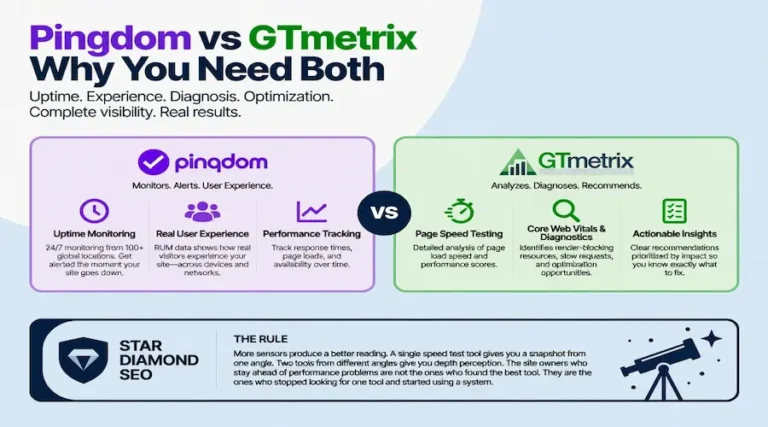
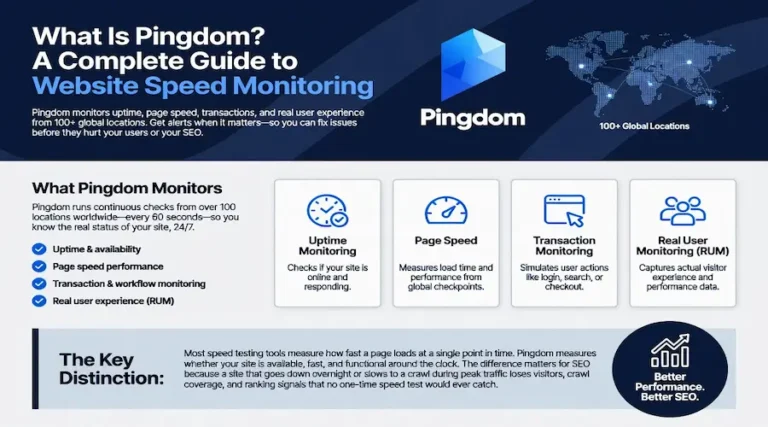
Pingdom shows you a waterfall chart that reveals which specific resources are slowing the page down. A 1.5 MB hero image consuming 40% of the load time is visible in the waterfall and immediately actionable. Without the test, you would not know that image was the bottleneck.
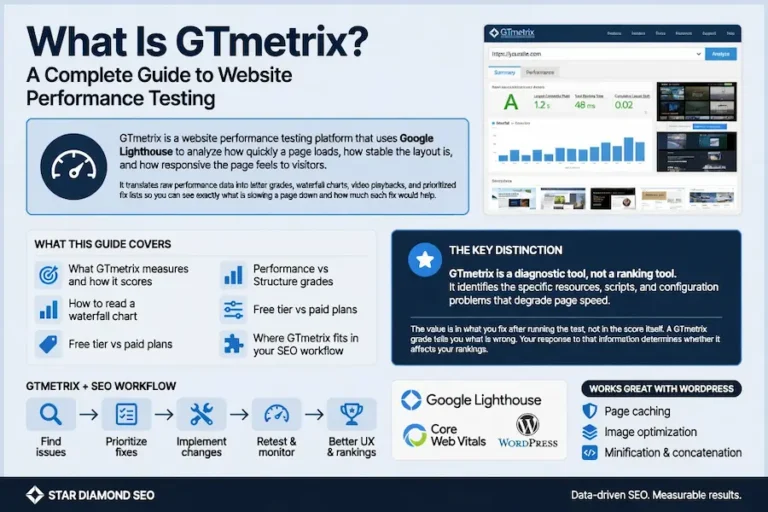
GTmetrix shows you Lighthouse scores with specific recommendations and estimated time savings for each fix. It quantifies how much faster the page would be if you deferred a render-blocking script or compressed an oversized stylesheet. The step-by-step GTmetrix guide walks through how to configure tests and interpret the results.
PageSpeed Insights shows you the field data Google is actually using for ranking alongside the lab diagnostics. It connects the ranking signal (field) with the fix list (lab) on the same screen.
Each tool serves a different diagnostic purpose. None of them improves your rankings directly. They identify the problems. You fix the problems. The fixes improve the metrics. The improved metrics remove a factor that was holding your rankings back. That is the chain. Skipping the fix step and expecting the test itself to help is like reading your blood pressure and wondering why it did not go down.
The complete testing framework, including when to use each tool and what each one reveals that the others miss, is covered in the website speed test guide.
Where Speed Testing Fits in an SEO Strategy
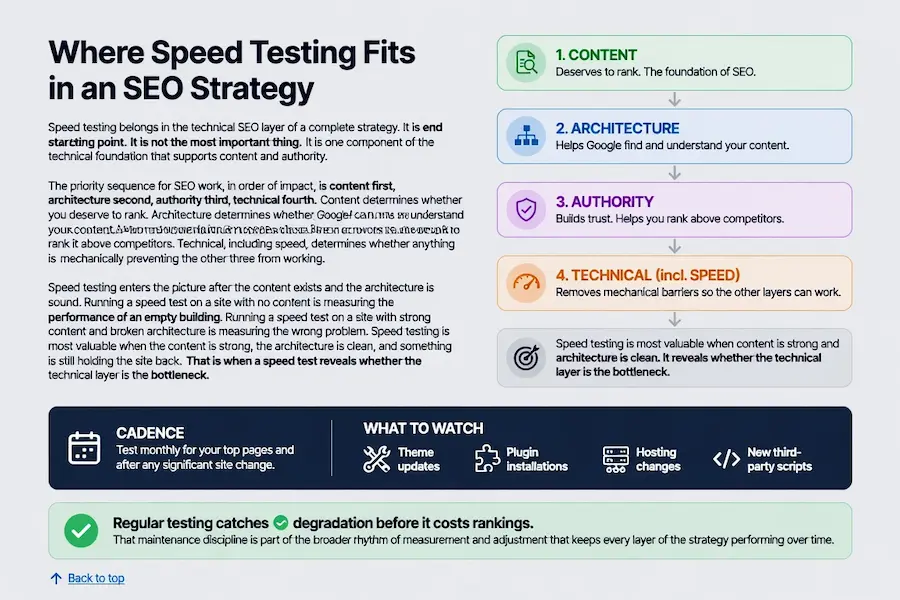
Speed testing belongs in the technical SEO layer of a complete strategy. It is not the starting point. It is not the most important thing. It is one component of the technical foundation that supports content and authority.
The priority sequence for SEO work, in order of impact, is content first, architecture second, authority third, technical fourth. Content determines whether you deserve to rank. Architecture determines whether Google can find and understand your content. Authority determines whether Google trusts your site enough to rank it above competitors. Technical, including speed, determines whether anything is mechanically preventing the other three from working.
Speed testing enters the picture after the content exists and the architecture is sound. Running a speed test on a site with no content is measuring the performance of an empty building. Running a speed test on a site with strong content and broken architecture is measuring the wrong problem. Speed testing is most valuable when the content is strong, the architecture is clean, and something is still holding the site back. That is when a speed test reveals whether the technical layer is the bottleneck.
The cadence for speed testing is monthly for your top pages and after any significant site change. Theme updates, plugin installations, hosting changes, and new third-party scripts can all degrade speed without any visible change on the front end. Regular testing catches degradation before it costs rankings. That maintenance discipline is part of the broader rhythm of measurement and adjustment that keeps every layer of the strategy performing over time.
FAQ
Does page speed affect SEO?
Yes. Google uses Core Web Vitals as part of its page experience ranking signal. The signal functions as a tiebreaker rather than a primary factor. Content relevance and authority determine most of the ranking. When two pages are closely matched on those signals, the faster page can win the higher position. Speed does not override content quality, but failing Core Web Vitals thresholds can hold back a page that would otherwise rank well.
What speed metrics does Google use for ranking?
Google uses the three Core Web Vitals measured through real user data collected by the Chrome User Experience Report. Largest Contentful Paint measures loading speed with a threshold of 2.5 seconds. Cumulative Layout Shift measures visual stability with a threshold of 0.1. Interaction to Next Paint measures responsiveness with a threshold of 200 milliseconds. All three are measured at the 75th percentile of real user visits, not from lab tests.
Does Google use lab data or field data for rankings?
Google uses field data for rankings. Field data comes from real Chrome users visiting your site on their own devices and connections, collected over a rolling 28-day window. Lab data from tools like PageSpeed Insights and GTmetrix is useful for diagnosing problems and verifying fixes, but it is not the data Google uses to evaluate your page experience for ranking purposes.
Will a perfect PageSpeed score help me rank higher?
Not on its own. A perfect score means your page is technically well-optimized, but speed is one signal among hundreds. A page with a perfect speed score and thin content will not outrank a page with adequate speed and authoritative content. The score is a diagnostic output, not a ranking guarantee. Its value is in identifying technical problems that might be holding back content that deserves to rank.
How slow does a page have to be before it hurts rankings?
The threshold where speed starts actively hurting is roughly where Core Web Vitals shift from needs improvement to poor. That means LCP above 4 seconds, CLS above 0.25, or INP above 500 milliseconds. Below those numbers, speed is a tiebreaker. Above them, speed becomes a drag that suppresses rankings and drives visitors away before they engage with the content.
Does page speed affect crawl budget?
Yes. Google allocates a limited number of requests to each site per crawl session. A slow server response means Googlebot crawls fewer pages in that window. For sites with hundreds or thousands of pages, slow response times can mean pages deep in the architecture wait days or weeks between crawls, delaying indexing of new content and re-evaluation of updated content.
How often should I run speed tests?
Test your top pages monthly and immediately after any significant site change such as a theme update, plugin installation, hosting change, or addition of third-party scripts. Speed degrades over time as content and complexity accumulate. Monthly testing catches degradation before it impacts rankings or user experience.
Which speed test tool should I use?
Use PageSpeed Insights for the field data Google actually uses for ranking alongside Lighthouse diagnostics. Use GTmetrix for detailed waterfall analysis and historical performance tracking. Use Pingdom for real-browser testing from global locations and uptime monitoring. Each tool serves a different diagnostic purpose and using all three together gives the most complete picture of your page performance.