Website Speed Test: Measure and Improve Your Site Speed
AI Summary
What is a website speed test? A website speed test measures how quickly a web page loads, how stable it is while loading, and how responsive it is to interaction. It is not an internet speed test. It evaluates how a specific page performs for the people visiting it. Modern speed tests produce lab data from controlled simulations and field data from real users. Google uses the field data for ranking, which makes speed testing a core SEO discipline rather than a developer afterthought.
What this guide covers and who it is for: This hub page covers what speed tests measure, why page speed matters for both users and rankings, the three primary testing tools (PageSpeed Insights, GTmetrix, Pingdom), the Core Web Vitals metrics that feed ranking signals, how to turn results into a faster site, and how speed fits the bigger SEO picture. It is for site owners, SEO practitioners, and developers who need a complete framework for understanding and acting on speed test results.
The bottom line: Page speed is one input among many, but it is one of the rare areas where Google’s interest and the visitor’s interest point in the same direction. The same improvements that lift Core Web Vitals also keep visitors engaged. Speed does not substitute for content quality, but it makes good content perform better. Sites that treat speed as ongoing maintenance outperform sites that treat it as a box checked once.
What a Website Speed Test Measures
A website speed test measures how quickly a web page loads and how stable and responsive it is once it does. Enter a URL, and the tool loads the page the way a browser would, recording how long the content takes to appear, how much the layout moves while it assembles, and how quickly the page responds to interaction. The output is a set of metrics and usually a score summarizing the page’s performance.
One distinction has to be made up front, because it causes constant confusion. A website speed test is not an internet speed test. An internet speed test, like the ones that report your download and upload speeds, measures your home or office connection. A website speed test measures how a specific web page performs for the people visiting it. Same words, completely different purpose. This guide is about the second kind, the one that tells you whether your site is fast for your visitors.
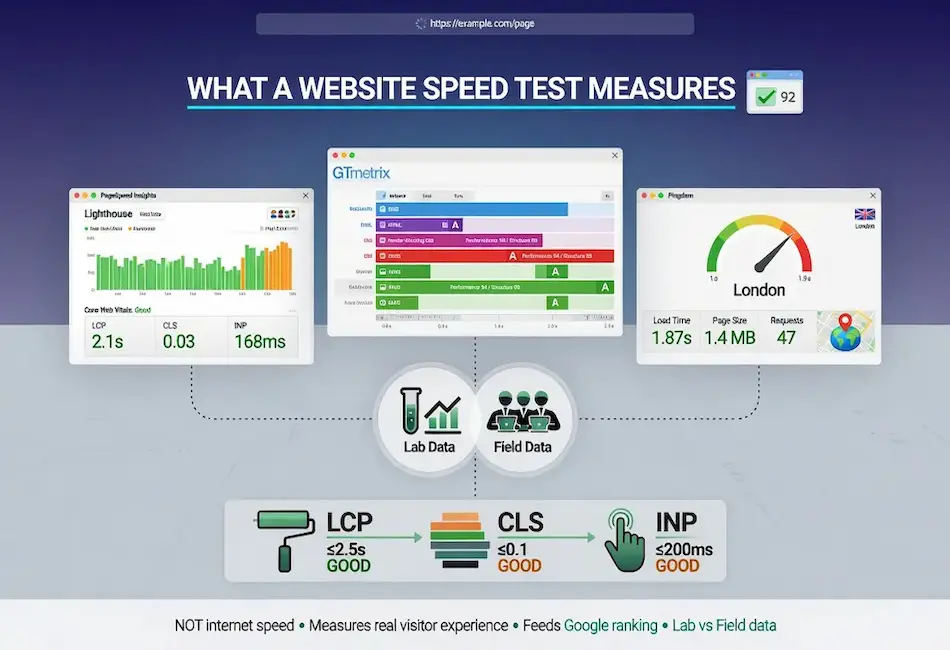
Modern speed tests measure two kinds of data. Lab data comes from a controlled test in a simulated environment, repeatable and good for diagnosis. Field data comes from real visitors using the page on their own devices, and it is what Google uses for ranking. Understanding which tool gives you which kind of data is the foundation of using any of them well, and it is a theme that runs through every section below.
The reason speed testing has become a core SEO discipline rather than a developer afterthought is that Google formalized the connection between page performance and search visibility years ago, and has only deepened it since. The helpful content framework reinforced the same principle from the content side: Google rewards pages that deliver a genuinely useful experience, and speed is one of the clearest measures of whether that experience meets the bar. A speed test is no longer a vanity check. It is a diagnostic that reveals whether your pages meet the experience bar Google measures, and whether they keep the visitors you worked to earn.
Why Page Speed Matters
Page speed matters for two distinct reasons, and both are worth keeping in view. The first is user experience and conversion. People abandon slow pages. Every additional second of load time increases the share of visitors who leave before they see anything, and the effect compounds on mobile where connections are slower and patience is shorter. A faster page keeps more of the visitors you worked to attract, regardless of any search engine consideration.
The second is SEO. Page speed feeds into Core Web Vitals, which are part of Google’s page experience signals. These function as a tiebreaker rather than a primary ranking factor: content relevance and quality come first, but when pages are closely matched, the faster, more stable page can win the position, and a slow page can be held back from where its content would otherwise rank. In competitive results, that margin matters. This connects to the larger picture of how Google ranks search results, where page experience sits among many signals rather than dominating any one of them.
The two reasons reinforce each other, which is the useful part. The same improvements that lift your Core Web Vitals also keep visitors engaged. You are not choosing between optimizing for Google and optimizing for users. Page speed is one of the rare areas where the search engine’s interest and the visitor’s interest point in exactly the same direction, which means the work is rarely wasted even when ranking gains are slow to arrive.
It also matters because speed problems compound silently. A site that launched fast accumulates weight over months as images are uploaded, plugins are added, and third-party scripts pile up. Without periodic testing, that decay goes unnoticed until rankings or conversions slip. Regular speed testing is the early-warning system that catches the drift before it costs you. This is where the discipline of cadence applies directly: speed is not a one-time project but a recurring checkpoint built into the rhythm of site maintenance.
The Speed Testing Tools
Three tools cover the great majority of website speed testing, and each answers a different question. Using them together gives a complete picture that no single one provides alone.
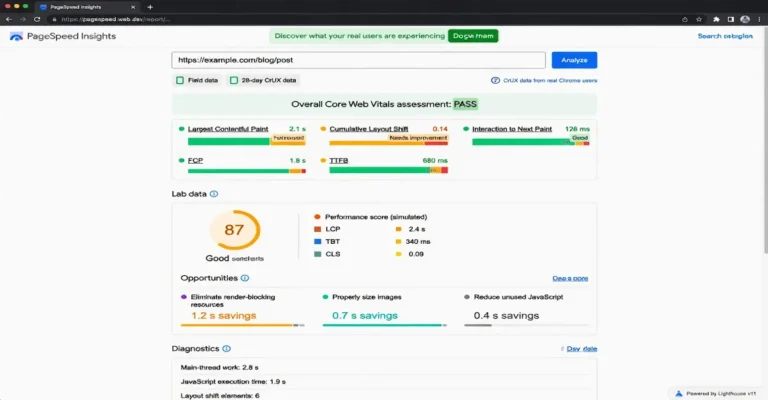
PageSpeed Insights is Google’s free tool and the most important for SEO, because it is the only mainstream tool that shows the real-user Core Web Vitals field data Google actually uses for ranking. It also provides Lighthouse lab diagnostics and a prioritized list of opportunities. Start here to know your real standing, because this is the data that maps to what Google sees.
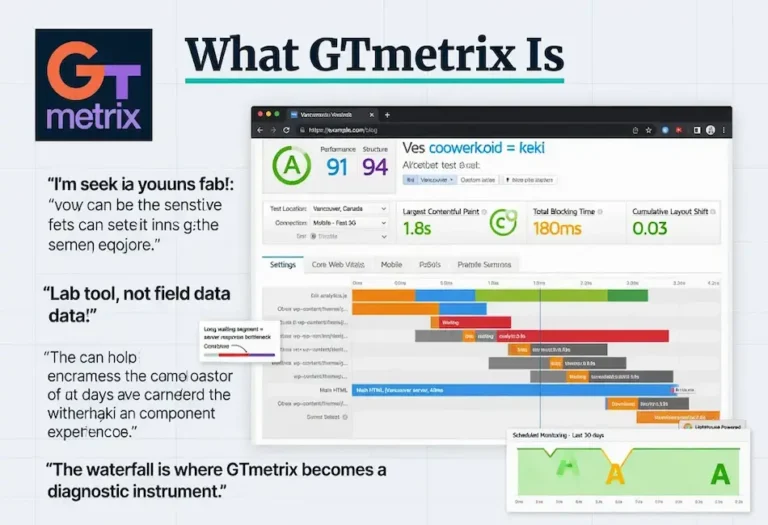
GTmetrix is the repeatable lab tool of choice for diagnosis and verification. It runs Lighthouse, adds a clean letter grade split into performance and structure scores, and provides a detailed request waterfall plus scheduled monitoring to catch regressions. Use it to isolate causes and confirm that fixes worked without waiting for field data to update.
Pingdom is the fast, simple geographic load test. It reports load time, page size, request count, and a clean waterfall, and it excels at checking how a page performs from a specific region. Use it for quick reads and client-facing snapshots when you need an answer in seconds.
The practical workflow ties them together: PageSpeed Insights for your real standing on the data Google ranks on, then GTmetrix or Pingdom to diagnose the cause through the request waterfall. One tells you whether you have a problem. The others tell you what is causing it. Treating them as a set rather than picking one is what separates effective speed work from guesswork.
The Metrics That Matter
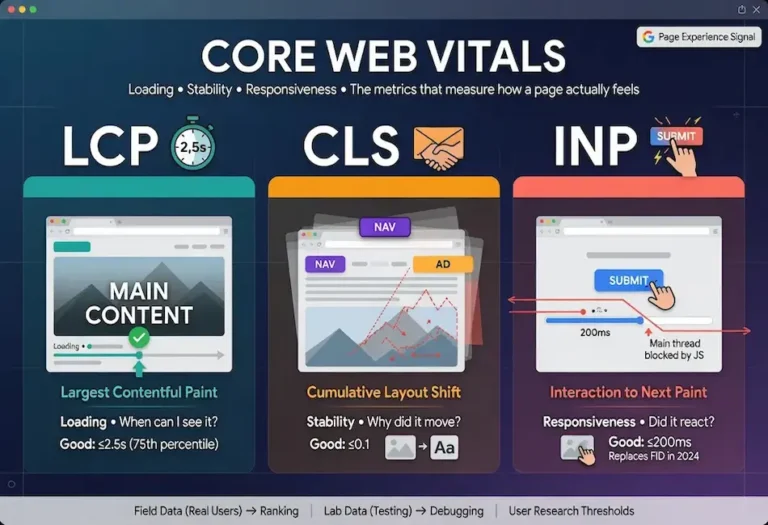
The metrics that matter most are the three Core Web Vitals, because they are what Google measures and what map most directly to how a page feels. Each gets a full treatment in its own guide, and understanding all three together is the foundation of meaningful speed work.
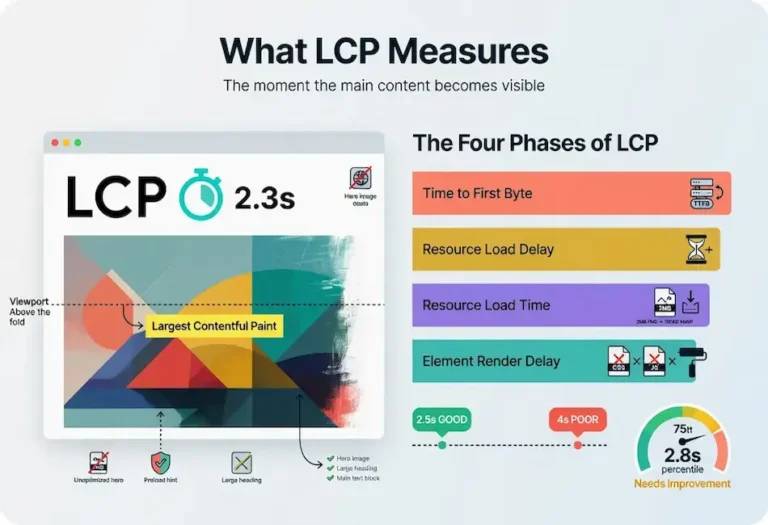
Largest Contentful Paint measures loading: how long the largest visible element takes to render. Good is 2.5 seconds or less. It is most affected by server response time, render-blocking resources, and image size, and for most content sites it is the metric with the highest improvement leverage.
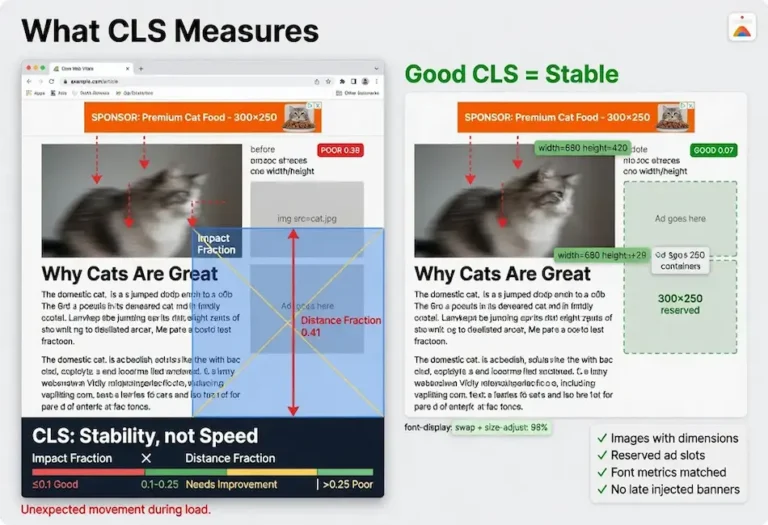
Cumulative Layout Shift measures visual stability: how much the page moves around as it loads. Good is 0.1 or less. It is most affected by images and ads without reserved space, and the fix is almost always reserving that space in advance.
Interaction to Next Paint measures responsiveness: how quickly the page reacts to taps and clicks. Good is 200 milliseconds or less. It replaced First Input Delay in March 2024 and is the strictest of the three, because it measures every interaction across the visit rather than just the first. It is most affected by heavy JavaScript tying up the main thread. Together these three, covered in full in the Core Web Vitals guide, are the metrics worth optimizing for, because they reflect real experience and feed real ranking signals. All three are measured at the 75th percentile of real users, which means your slower visitors count toward the score, not just your average.
Turning Results Into a Faster Site
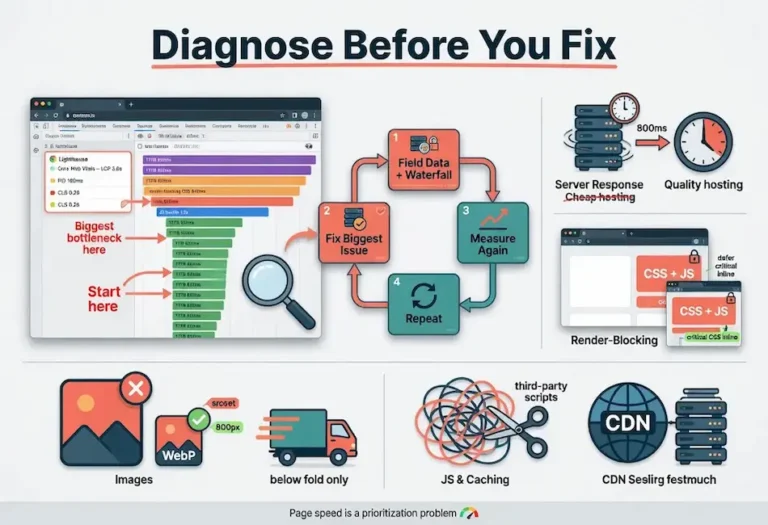
A speed test result is only useful if it leads to changes. The discipline that separates effective optimization from wasted effort is working in order of impact: diagnose where the time is actually going, fix the biggest bottleneck, measure, then move to the next one. Applying a generic checklist without diagnosis is how people spend hours and see no improvement.
The highest-leverage fixes, in rough order of how often they matter, are upgrading slow hosting to cut server response time, eliminating render-blocking CSS and JavaScript, optimizing images through modern formats and correct sizing, reducing and deferring JavaScript, and implementing caching and a CDN. Which of these matters most depends entirely on your specific page, which is why the diagnosis step is not optional. The complete walkthrough lives in the page speed optimization guide, which works through each fix in priority order.
Speed problems do not exist in isolation. A page loading slowly because of render-blocking scripts may also be generating crawl errors that prevent Google from processing the page correctly. A server with slow response times creates crawlability problems that extend beyond the single page being tested, because Googlebot allocates a limited crawl budget to every site and a slow server burns through that budget before all pages have been reached. Speed, crawl health, and indexing are connected systems, and fixing one often reveals or resolves issues in the others.
Page speed is also not a one-time project. Sites accumulate weight over time as plugins are added, images are uploaded, and third-party scripts pile up. A page that passed its Core Web Vitals last year can quietly fall out of compliance after months of additions. The sites that stay fast are the ones that monitor performance and treat it as ongoing maintenance, not a box checked once.
Faster pages also serve search engines better, not just human visitors. A quick server response and a lean page let Googlebot retrieve more of your site in less time, which improves how efficiently Google can crawl the site. That crawl efficiency connects directly to the broader foundation of crawlability, one of the five pillars we build every strategy around. Speed is where technical performance and crawl health overlap, which is why it earns attention beyond its direct ranking weight.
How Page Speed Fits the Bigger SEO Picture
Page speed is important, but it is one input among many, and keeping it in proportion prevents the common mistake of obsessing over a perfect score while neglecting the things that matter more. The most useful way to place speed is within a complete framework, which is how we approach every site we work on.
Speed sits squarely inside the technical layer of SEO, alongside crawlability and the measurement discipline of calibration, our term for the continuous testing and adjustment that keeps a site healthy. A fast site that cannot be crawled still fails. A crawlable site with strong content but a sluggish experience leaves rankings on the table. The pieces work together, and speed is one of several that have to be right at the same time.
Above the technical layer sits content. The fastest page on the internet will not rank for a query it does not genuinely answer, which is why content strategy comes first in any sane prioritization. Content that follows SEO writing principles and is organized through a clear architecture performs better when the technical foundation is solid underneath it. If you are building topical authority, the structure of that content matters as much as its speed, and our guide to what a content pillar is explains how to organize a site so both users and search engines can navigate it. Page speed makes good content perform better. It does not substitute for it.
The on-page fundamentals tie the layers together. Even a fast, well-structured page needs the basics handled correctly, from heading hierarchy to internal linking to image attributes that happen to also affect layout stability. Our on-page SEO checklist covers those fundamentals, several of which overlap directly with the speed fixes in this cluster. Optimizing images for the checklist, for instance, is the same work that improves your Largest Contentful Paint. The disciplines are not separate silos. They reinforce each other, and a site that treats them as one system outperforms a site that treats speed as an isolated technical chore.
Rendering is the place where speed and Google’s actual mechanics meet most directly. When Googlebot processes a page, it has to render it much as a browser would, and a page burdened with render-blocking resources and heavy JavaScript is harder and slower to render. Understanding how Google renders the SERP clarifies why the same factors that slow a page for users also complicate how Google processes and displays it. Speed, rendering, and crawl efficiency are facets of the same underlying property: a page that is light and well-built is easier for everyone, human and machine, to use.
Working With an SEO Partner on Speed
There is a real question of when to handle page speed yourself and when to bring in help, and the honest answer depends on the bottleneck. Some speed fixes are accessible to any site owner. Installing a quality caching plugin, converting images to modern formats, and removing unused plugins are within reach of a non-developer willing to follow a careful process. If your speed problem is mostly image weight and missing caching, you can likely handle it with the optimization guide and an afternoon.
Other fixes are not. Eliminating render-blocking resources correctly, restructuring how a JavaScript framework renders, diagnosing a slow backend, or rebuilding a bloated theme are the kind of work where a wrong move breaks the site or wastes weeks. When the bottleneck is structural rather than cosmetic, the cost of trial and error usually exceeds the cost of having it done right. A proper SEO site audit reveals which situation you are in, because the diagnosis itself shows whether the problem is a quick fix or a structural rebuild. Understanding what an SEO company actually does helps set expectations for what that engagement looks like and what you should expect in return for the investment.
This is part of what we do at Star Diamond SEO. A technical audit identifies exactly which bottleneck is holding your pages back, and the fix is prioritized by impact rather than applied as a generic checklist. If you would rather have page speed handled as part of a complete technical foundation than learn the full discipline yourself, you can see our technical SEO services or request a free audit that includes a performance review of your top pages. Either way, the goal is the same: a site that is genuinely fast for the people who land on it, which is the only definition of speed that ultimately counts.
FAQ
What is the difference between a website speed test and an internet speed test?
An internet speed test measures the download and upload speed of your home or office connection. A website speed test measures how a specific web page performs for the people visiting it, including how fast it loads, how stable the layout is, and how quickly it responds to interaction. They measure entirely different things. A fast internet connection does not guarantee a fast website, and a slow website can load slowly even on a fast connection.
Which speed test tool should I use first?
Start with Google PageSpeed Insights. It is the only mainstream tool that shows real-user Core Web Vitals field data, which is the data Google actually uses for ranking. After you know your real standing, use GTmetrix or Pingdom to diagnose the specific causes through the request waterfall. PageSpeed Insights tells you whether you have a problem. The other tools tell you what is causing it.
What is a good page speed score?
A PageSpeed Insights score of 90 or above is considered good, but the score itself is less important than the individual Core Web Vitals metrics. A page can score 85 and pass all three Core Web Vitals, or score 92 and fail one. Focus on meeting the thresholds that matter: Largest Contentful Paint under 2.5 seconds, Cumulative Layout Shift under 0.1, and Interaction to Next Paint under 200 milliseconds. Those are the numbers Google uses for ranking, not the overall score.
Does page speed directly affect search rankings?
Yes, but as a tiebreaker rather than a primary factor. Content relevance and quality determine most of the ranking. When pages are closely matched on content signals, the faster and more stable page can win the position. A slow page will not outrank a fast page with better content, but a slow page with strong content can be held back from the position it would otherwise earn. In competitive results, the margin matters.
How often should I run a website speed test?
Test your top pages monthly and after any significant site change such as a plugin update, theme change, or new third-party script. Sites accumulate weight over time as images are uploaded and scripts are added, and performance can degrade without any obvious trigger. GTmetrix offers scheduled monitoring that can alert you to regressions automatically. Treating speed as an ongoing checkpoint rather than a one-time project is what separates sites that stay fast from sites that quietly slow down.